Operational Update - New Tool for Missing Complimentary Experiences

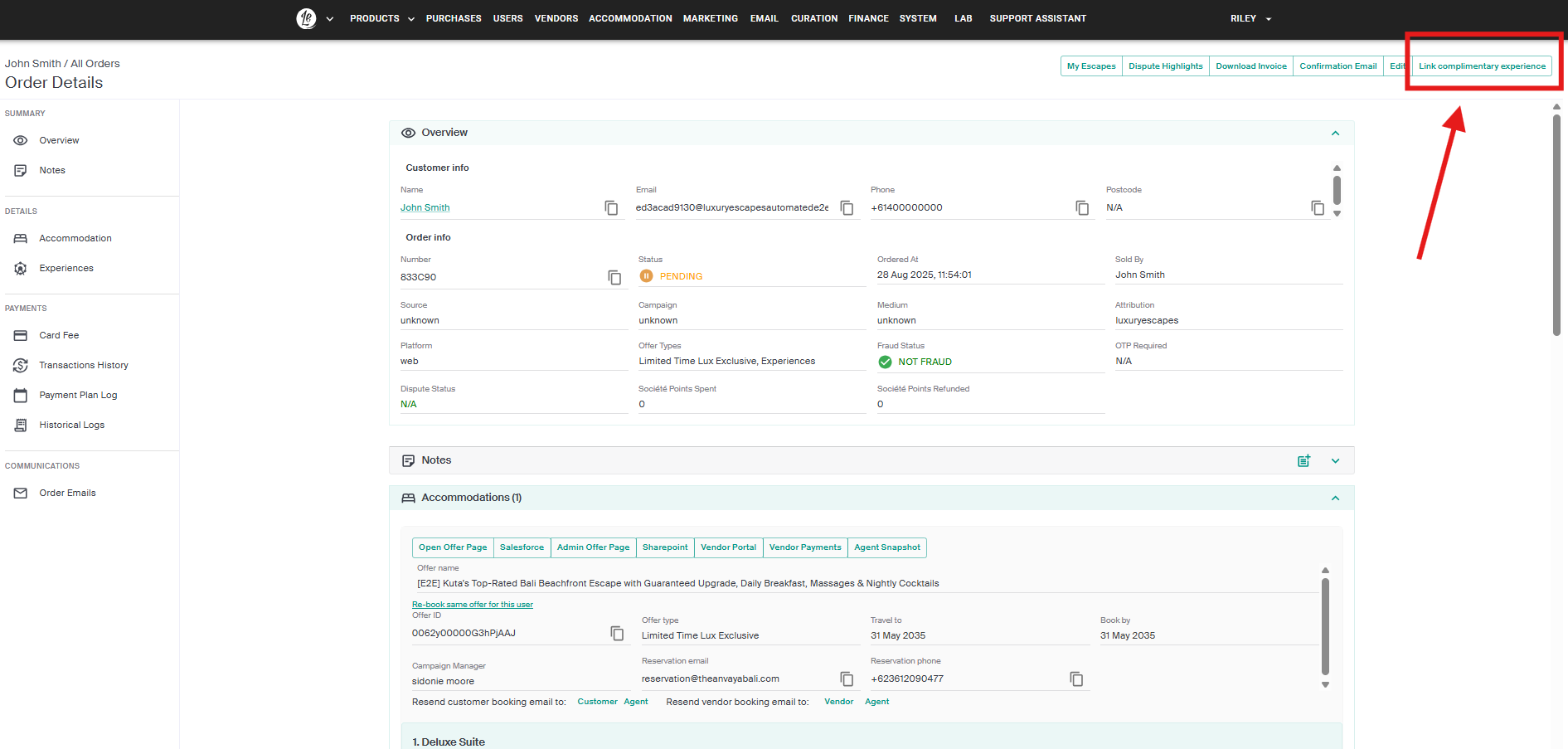
Tech have identified an increase in cases where airport transfers aren’t appearing on customer bookings, even though they should be. To streamline fixes, the Experiences team has introduced a new “Link Complimentary Experience” button, located on the top right of the order details page.
How it works:
- ✅ If transfers are already on the order → Nothing changes.
- ✅ If the order is not applicable for an experience → Nothing will happen (tech won’t be notified).
- ✅ If the order is applicable and the experience loads after pressing the button → The transfer will be added, and tech will be notified (no need to raise a bug).
- ❌ If the order is applicable but the experience does not load → Please raise in the Escalation channel for bug report approval.
- 🔄 If the button is pressed more than once → No issues; the backend has a safeguard.
Action:
CS agents to use this option if they come across bookings where transfers are missing.
If you have any questions, please reach out to your TL
📧 This was also communicated via email on 28th August 2025, titled "New Tool for Missing Complimentary Experiences" sent by Riley L (Customer Experience Operations Leader).
0
Please sign in to leave a comment.
Comments
0 comments