Operational Update: New Customer Verification Banner in Zendesk

Quick update on a new feature now live in Zendesk.
What’s new?
Calls handled by our AI Voice Bot Lucas include an automatic verification step. Lucas will either successfully verify the customer or be unable to do so. To make this easy to see at a glance, we’ve added a verification banner in Zendesk.
Where you’ll see it
Open any ticket linked to a Voice Bot AI call and look in Customer Information app:
- ✅ Green banner: “Customer Verified”
The customer has successfully passed verification via the AI Voice Bot. - 🚫 Red banner: “Not Verified – Check Admin to Verify”
AI Voice Bot couldn’t verify the customer.
What you need to do
If GREEN / Verified:
- You can proceed with the request as normal.
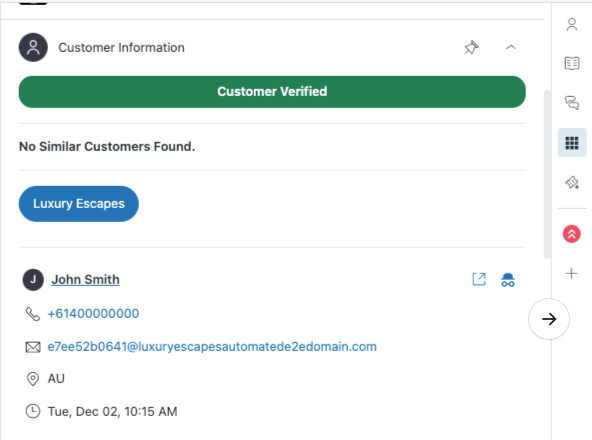
If RED / Not Verified:
- Follow your usual manual verification process via Admin Portal.
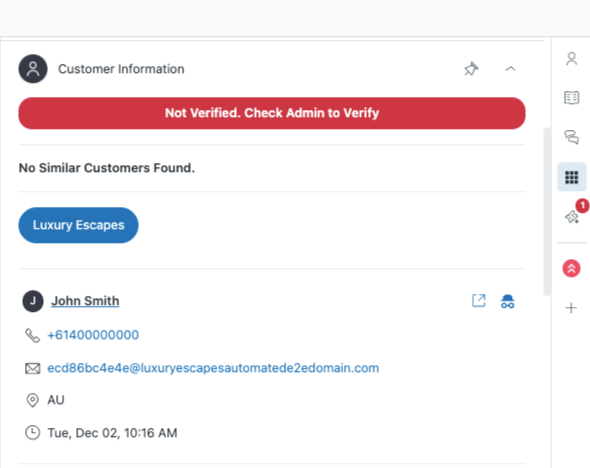
Why this matters
This is designed to:
- speed up handling for verified customers
- reduce re-checking
- keep high-risk actions protected when verification fails
If you have any questions, please reach out to your TL.
📧 This was also communicated via email on 2nd December 2025, titled "📣 Release: New Customer Verification Banner in Zendesk" sent by Jamie L (Agent Support).
0
Please sign in to leave a comment.
Comments
0 comments